Skip to content
How it thinks

Most finance apps hand you a spreadsheet
and call it insight.

This one does the work.
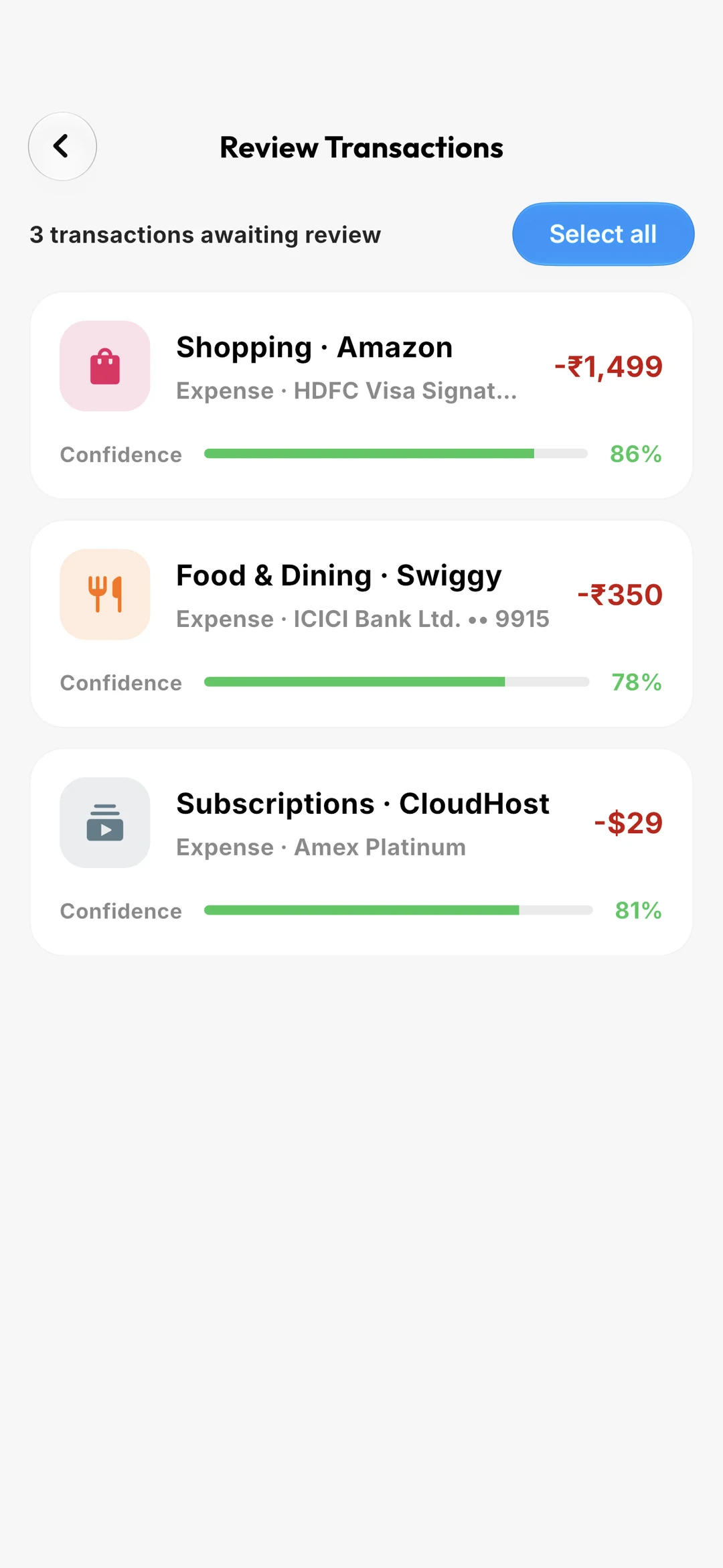
The review queue: three auto-imported transactions awaiting confirmation, each with a confidence score.
9:41
01It starts

Your bank already texts you. Let it do the typing.

Every debit alert your bank sends is a transaction you shouldn’t have to enter twice. WealthWise reads them on your phone, works out the merchant, the amount, the account and the category, and files the spend before you’ve put the phone back in your pocket.

02It asks

When it isn’t sure, it says so.

A message that says both “transaction” and “credited” is ambiguous, and guessing wrong turns your salary into an expense. So it doesn’t guess. Anything it can’t resolve lands in the Review Queue with everything it did extract, and a confidence score you can actually see.

03It adds up

The number that tells you what today is worth.

Not your balance. Your balance is a lie by the 3rd of the month. Safe-to-Spend takes what’s in the bank, adds the income still due, subtracts the bills, the card dues and the goals you’ve committed to, and divides what’s left by the days remaining.

04It notices

The subscription you forgot. The price that went up.

Same merchant, same-ish amount, on a regular beat, three times running: that’s a subscription, whether or not you remember signing up. WealthWise finds them, tells you when the next one lands, and flags it the month the price quietly changes.

05It travels

A trip is lived in its own currency.

In Dubai you think in dirhams, not rupees. So a trip carries its own currency, its own budget, its own daily allowance, and converts nothing back until you ask. Start a trip and new spending files itself under it, already in the right money.

06It remembers

Every bill, before it lands.

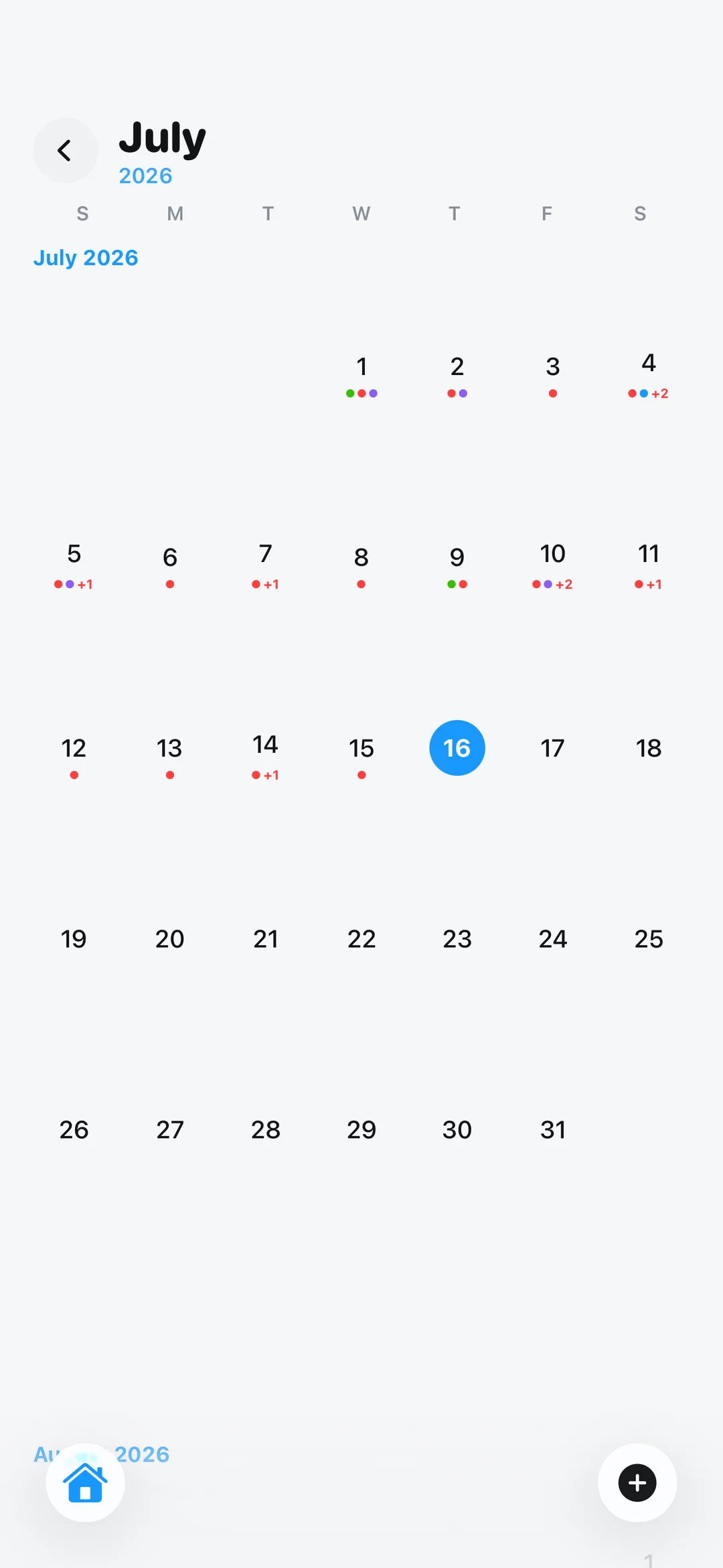
Rent on the 1st. The card on the 19th. The renewal you set up last March. They all sit on one calendar alongside what you’ve actually spent: real transactions in their own colours, everything still coming in purple.

07It understands

Patterns you’d never catch by scrolling a list.

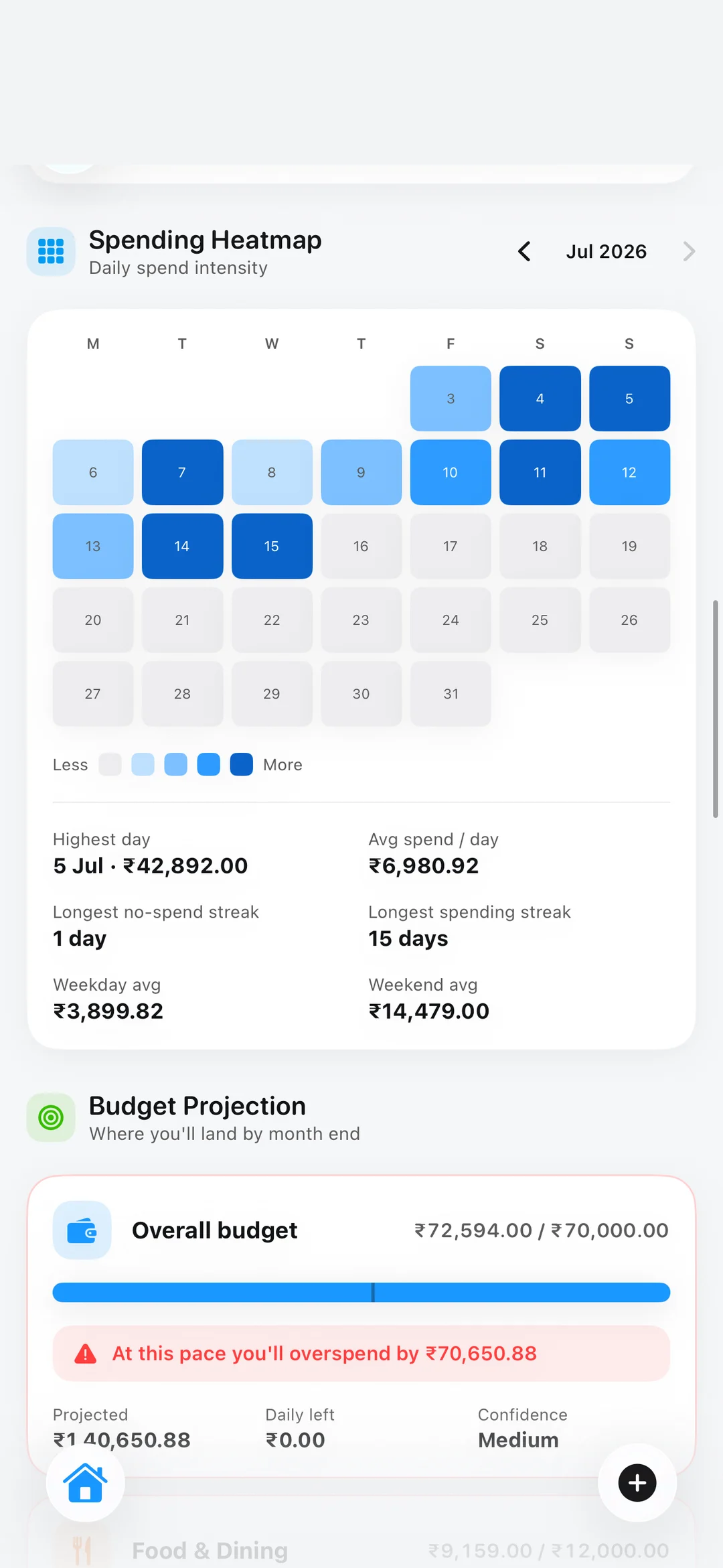
Which merchant is quietly growing. Which category moved this month. Your longest no-spend streak. How much heavier weekends are than weekdays. All computed on your phone, in a background thread, cached so it opens instantly.

08It counts everything

The whole balance sheet, not just the cash position.

Your flat. Your gold. The mortgage. The loan. What your friend still owes you from that dinner. Net worth only means something when it counts the things no transaction can see, and when marking your flat up today steps the line up today, instead of rewriting history.

09It adds up to this

A life, organised. Without ever leaving your phone.

No bank login. No cloud model reading your spending. No account required. The intelligence runs where your money already is: on the device in your hand, with airplane mode on if you like.
ULTRAAutomatic import

Stop typing in what
your bank already told you.

Eleven banks parsed by name (HDFC, ICICI, Axis, Kotak, SBI, IDFC, IndusInd, Yes, AU, UPI apps), over one shared engine, so a fix for one is a fix for all. No bank login. No Plaid. No credentials. Just the messages your bank is already sending you, read on your own phone.

What arrives
AD-HDFCBK

Sent Rs.480.00 from HDFC Bank A/c XX4821 to BLUE TOKAI COFFEE on 14-07. Avl Bal Rs.84,610. Not you? Call 18002586161

On your device
Filter
Parse
Merchant
Categorize
File
What you get
Blue Tokai Coffee
Food & Dining · HDFC •• 4821
-480
Confidence
94%

The amount is found, not guessed. The currency-marked figure wins, so `XX4821` can’t be read as money.

And `Avl Bal Rs.84,610` is the closing balance, never the transaction.

No bank texts? Import the statement.

SMS import quietly makes an app India-first. A statement file works everywhere, and it’s how you backfill the years before you installed this. CSV, OFX/QFX and QIF, with the format sniffed from the content, so an OFX emailed as .txt still parses.

CSV is the messy one, so it’s handled properly.

The delimiter is sniffed. The header row is found under the net-banking preamble junk. Columns auto-map from a synonym table: Narration, Particulars, Withdrawal Amt, Money out. Lakh grouping, Dr/Cr markers and accountant (1,234.00) negatives all parse. Then it shows you the mapping so you can re-point any column.

Re-import an overlapping range. Nothing doubles.

Jan–Mar, then Feb–Apr: the normal way people actually use this. Dedup checks the ledger itself, not just the queue, and prefers the bank’s own reference number as the identity key when the file provides one.

PROAI Insights

Understand your spending
before it becomes a problem.

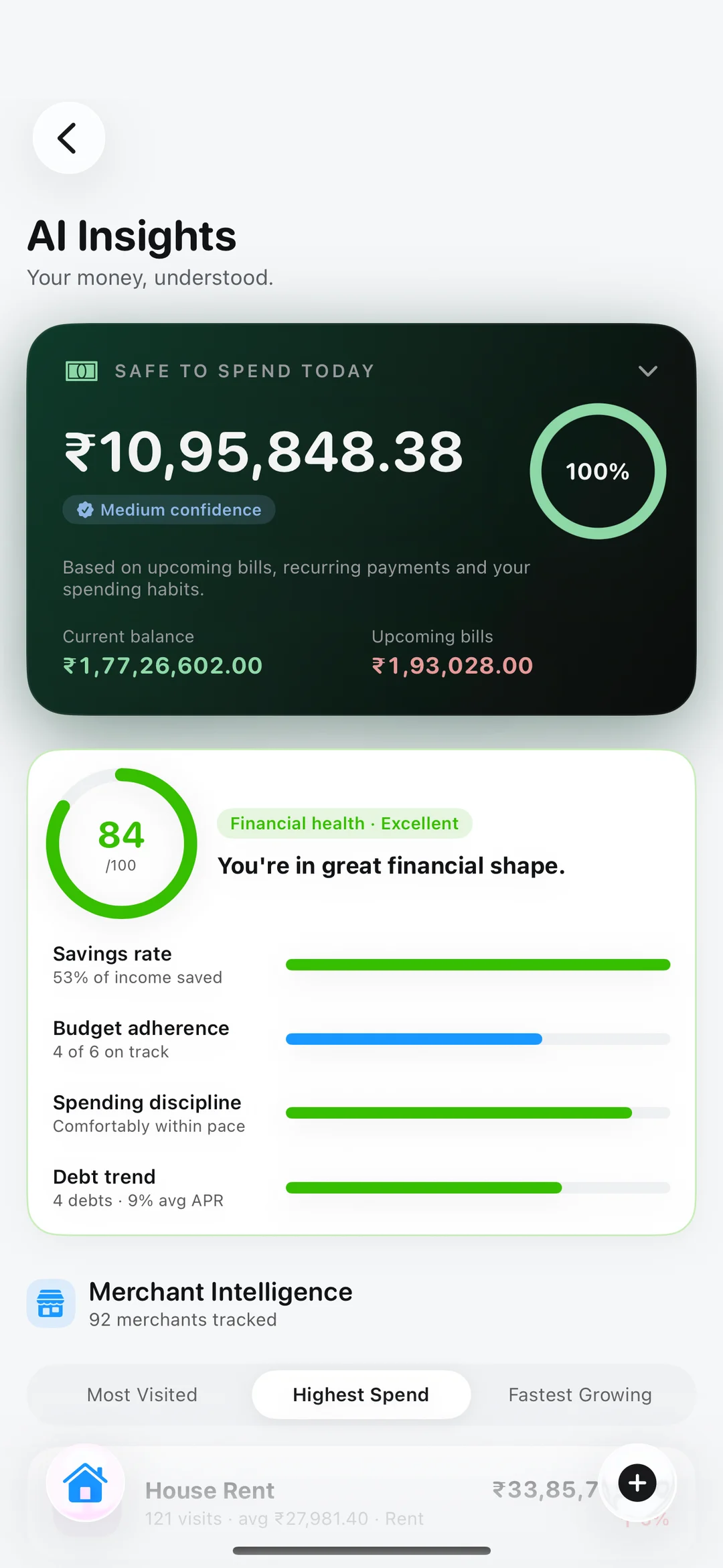
A health score, a merchant profile, a subscription you forgot, a forecast of where you land in 90 days, all computed on your phone, in a background thread, from your own ledger. Turn on airplane mode and it still works. There is no model in the cloud reading your money.

0
/ 100

Financial health

Savings rate, budget adherence, spending discipline and debt trend, weighted into one number you can actually move.

Savings rate35%
Budget adherence25%
Discipline20%
Debt trend20%

Merchant intelligence

Every merchant, profiled: total spend, visits, typical weekday, usual payment method, and whether it's quietly growing month over month.

Swiggy
18 visits
+34%12,400
Uber
26 visits
−12%8,900
Amazon
9 visits
+8%21,300
AI Insights: safe-to-spend for today, and a financial health score of 84 out of 100.
9:41

Subscription detector

Same merchant, stable amount, regular interval, three charges deep: that's a subscription, whether or not you remember signing up.

Netflix raised its price
₹499 → ₹649 · next on 22 Jul
Add as recurringDismiss

Cash-flow forecast

Where your balance lands in 30, 60 or 90 days, with the danger zone marked before you fall into it.

Today
84.6k
In 90 days
1.29L
Lowest
71k

Every day you spent, and every day you didn't.

A year of spending as a single grid. Your longest no-spend streak, your heaviest day, how much more weekends cost you than weekdays. Tap any square to open that day's timeline.

Longest no-spend
6 days
Heaviest day
₹12,400
Weekend lift
+38%
Logging streak
67 days
The spending heatmap: every day of the month shaded by how much was spent on it.
9:41

Every insight above was computed on your phone.

No model in the cloud. No API call. No prompt containing your salary. The entire intelligence layer is rule-based, deterministic, and runs in a background isolate against your local database, cached by ledger revision, so it opens instantly and only recomputes when something actually changed.

0
API calls made
0
Bytes of spending sent
0%
Percent on-device
PROTrips

In Dubai, you think
in dirhams.

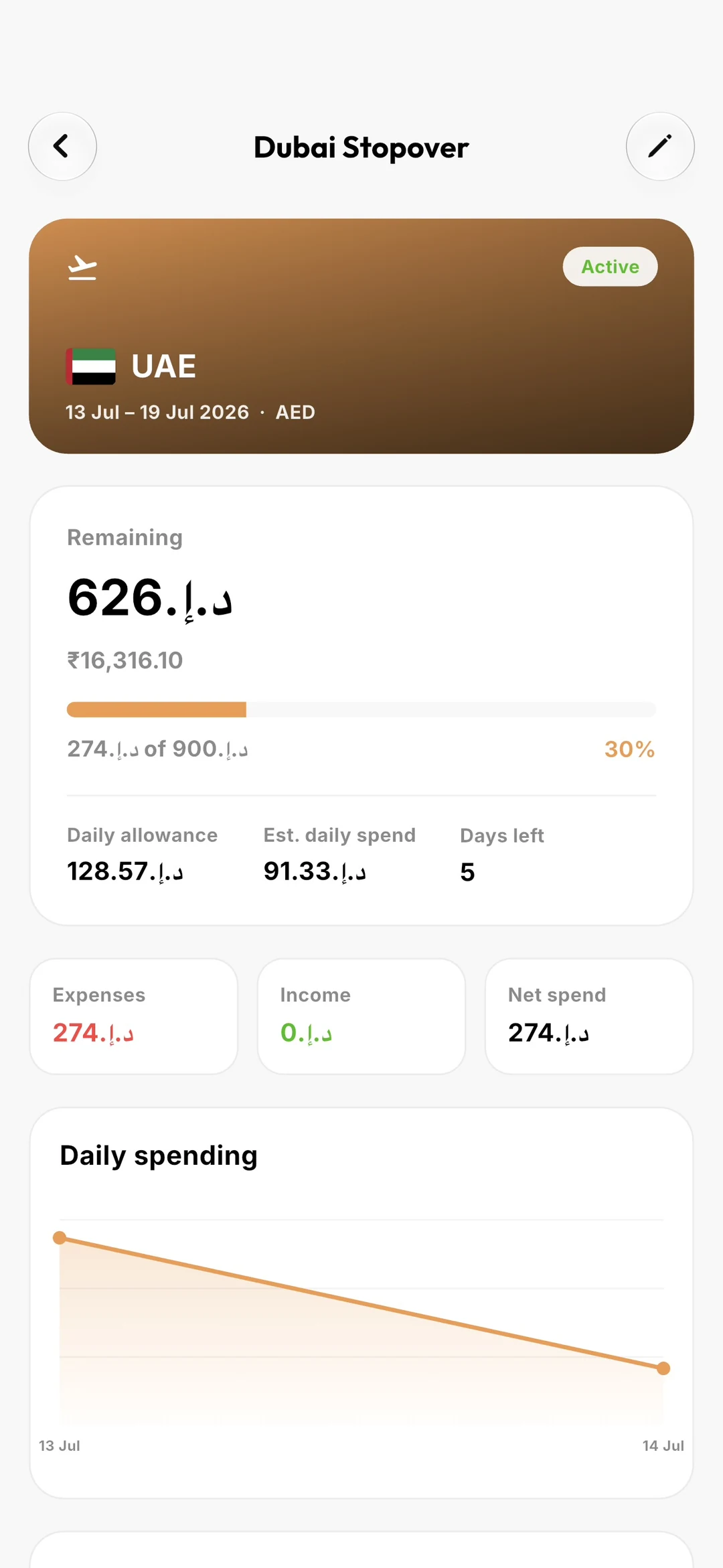
So your trip does too. Every trip carries its own currency, its own budget, its own daily allowance, and converts nothing back to your home currency until you ask. Because converting AED 340 into rupees on the summary screen makes it useless for the one thing it's for: deciding whether you can afford the thing in front of you.

🇦🇪
Dubai Stopover
5 days left
ACTIVE
AED 4,360of AED 7,500
₹71,290, shown only because you still bank in rupees
Daily allowance
AED 937
Est. daily spend
AED 872
Left per day
AED 628
A trip to the UAE, budgeted in dirhams, with the daily allowance and spend-to-date tracked against it.
9:41

One trip running? It files itself.

Start a trip and a new expense opens already filed under it, and already in dirhams. Pick a different trip and the amount field switches currency with you. Clear it and you snap back to rupees.

It counts the card. A budget doesn’t.

Category budgets exclude credit-card spend. They count it when the bill is paid. But paying by card is how you spend abroad, and that rule left the trip bar reading zero while the Expenses tile beside it read €274. So a trip counts the card.

A split dinner costs the trip your share.

Front a €400 dinner three ways and your bank balance still drops €400, but the trip, the budget and Safe-to-Spend see only your €133. The ledger stays honest; the numbers stay useful.

It ends by itself.

A trip’s status is computed from the calendar, not stored, so it turns Completed the moment midnight passes, drops out of the picker so nothing new files under a finished trip, and archives itself if you asked it to.

Trips also ride the home-screen widgets and the Apple Watch, pre-formatted in the trip's own currency, so the wrist and the phone can never disagree.

The rest of it

Everything else you were going to ask for.

Budgets that carry their leftovers. Debts that know their own amortisation. Bills that never surprise you. Friends who owe you money, counted as the asset they are.

Budgets that remember last month

Turn on envelope mode and the previous window's leftover carries into this one, signed, so underspending raises the cap and overspending lowers it. The carry shows as a ↻ badge, so you always know why the number moved.

Food & Dining+₹1,4006,200 / ₹10,000
Shopping−₹9008,900 / ₹8,000

Debts that know their own maths

Give a loan a start and an end date and it works out the rest: the instalment, the interest split, how many EMIs you've served. Reducing-balance amortisation, unit-tested against textbook figures.

Car loan
4,86,200
18 of 60 EMIs · ends Mar 2029
Monthly EMI8,792
Interest paid41,300
Interest left64,205

And a standalone calculator that reads and writes nothing, so it's as useful before you take the loan as after.

Goals that fund themselves

Set a rule and stop thinking about it. Move a fixed amount every month, or sweep the spare change from every purchase, rounded up to the next ₹10, ₹50 or ₹100.

Japan fund73%
₹2,19,000 of ₹3,00,000 · 🎉 75% milestone next

Bills that never surprise you

Daily, weekly, monthly, yearly, or every second Tuesday. Jan 31 rolls to Feb 28 and back to Mar 31, because that's what a monthly bill actually does.

RentTomorrow32,000
HDFC card19 Jul18,420

The money owed to you is an asset

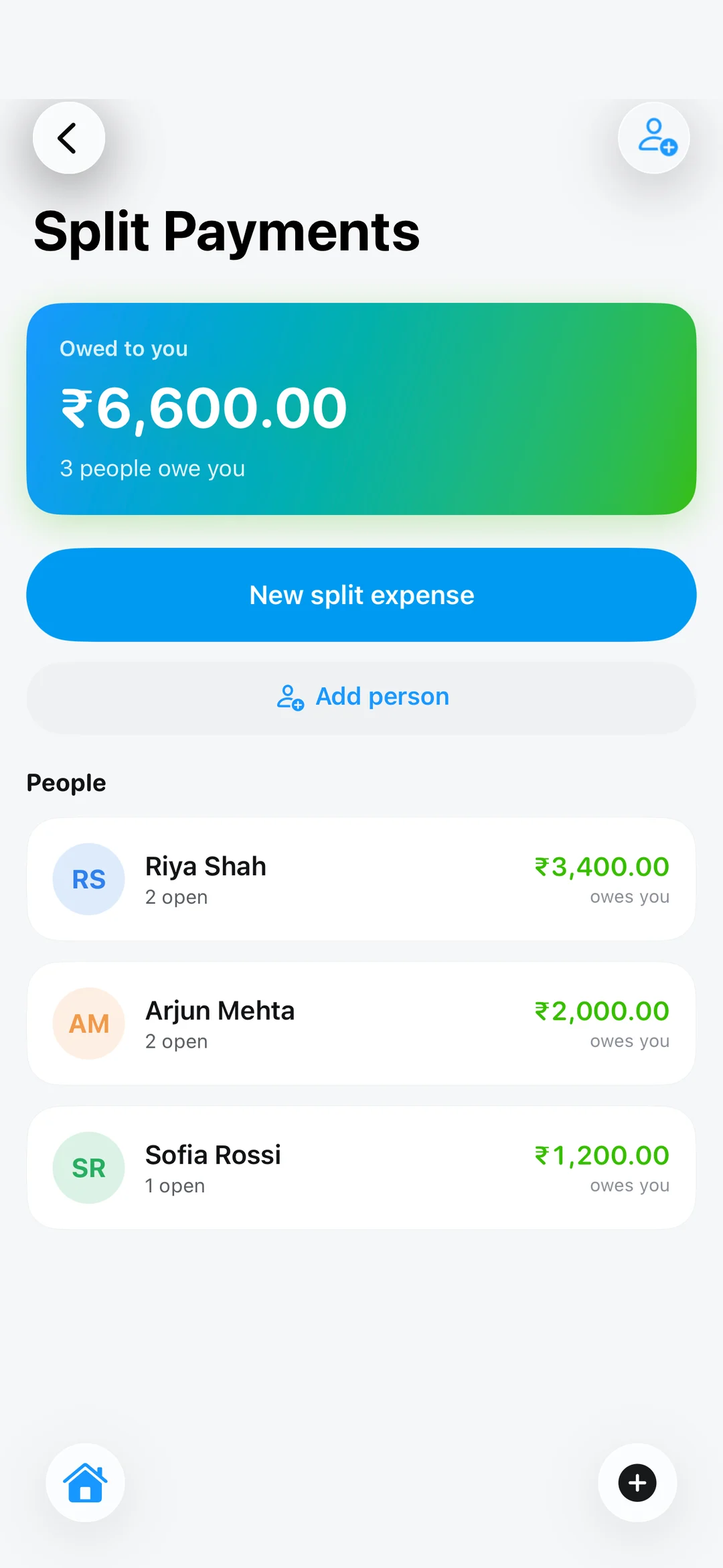
Split any bill: equally, by exact amounts, or by weights when someone eats double. Your bank balance still drops the full ₹4,000, because that's what really happened. But budgets, Safe-to-Spend, analytics and your net worth see only your ₹1,000 share.

Settle up and it posts a real credit into your account, flagged so it never counts as income. It's a receivable turning back into cash.

Free: splitting is core tracking
Split payments: what each person still owes you, across open splits.
9:41
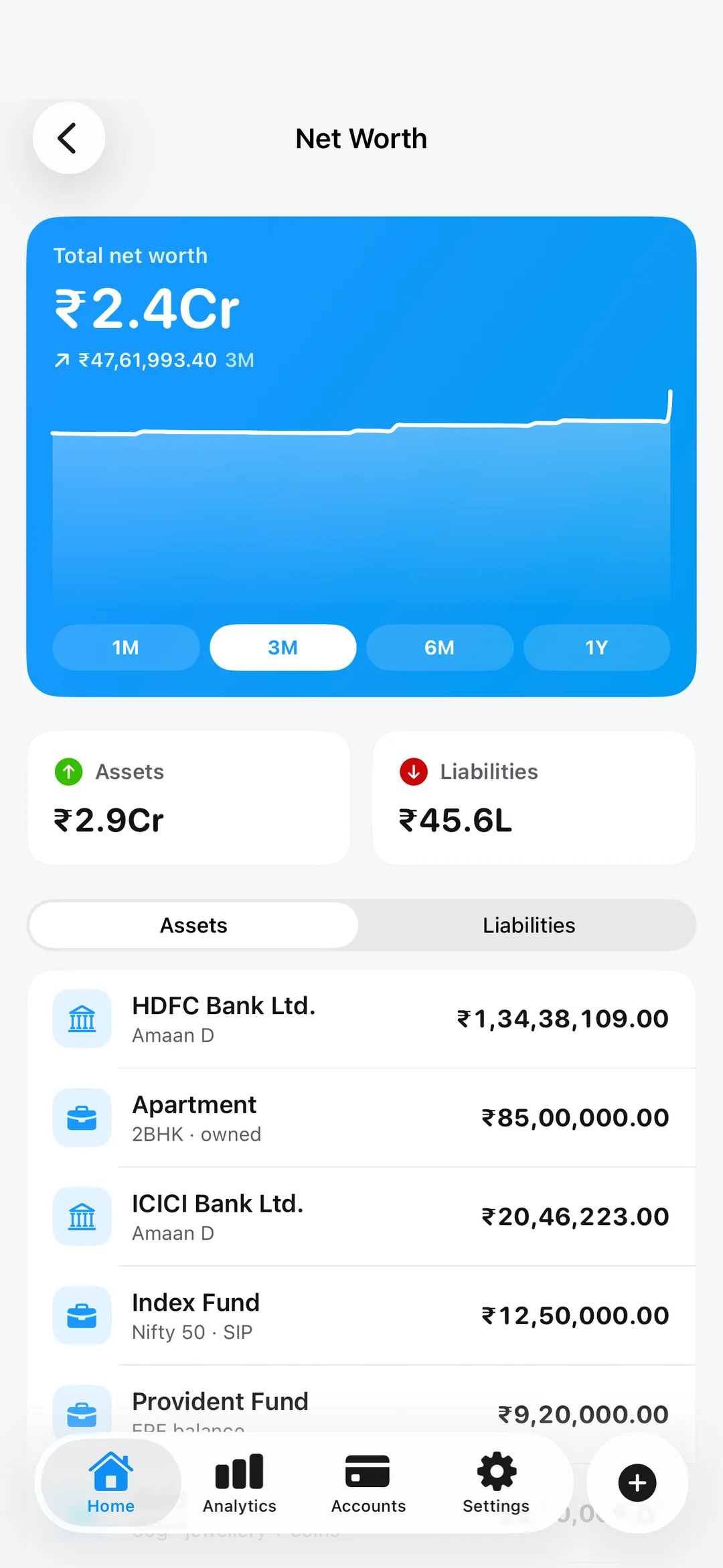
Net worth over time, with assets and liabilities totalled beneath the chart.
9:41

The whole balance sheet

Net worth that counts only your bank balance is a cash position, not a net worth. So it adds the things no transaction can see: the flat, the car, the gold, the folio, the EPF. And the mortgage, the loan, the money you owe your family.

Revaluations are dated. Mark your flat up today and the line steps up today, instead of retroactively pretending it was always worth that.

Your money, on a calendar

Year, month and day: one continuous glass surface that zooms between levels. Real transactions in their own colours (income green, spend red, transfers blue), and everything still coming in purple: the recurring rules, the card due dates, the goal deadlines.

Drill into a day and you get an hourly timeline. Bills renewing within three days nudge you before they land.

The bill calendar: a month of scheduled payments, income and recurring charges.
9:41

Reports that carry the thinking

Export to PDF, CSV or Excel, and the AI insights travel with it. The health score, the narrative feed, the detected subscriptions, the forecast. Still computed offline.

PDFCSVXLSX

A 30-day undo for everything

A local-only app has no server copy to fall back on, so deleting is soft, everywhere. Transactions, budgets, categories, debts, goals, recurring rules, even the alerts in your inbox. Restore any of it for thirty days.

Trashed rows stop counting toward balances, budgets and insights the moment they're deleted, filtered at the source, not per query.

A one-day spark and a hundred-day legend should not look the same

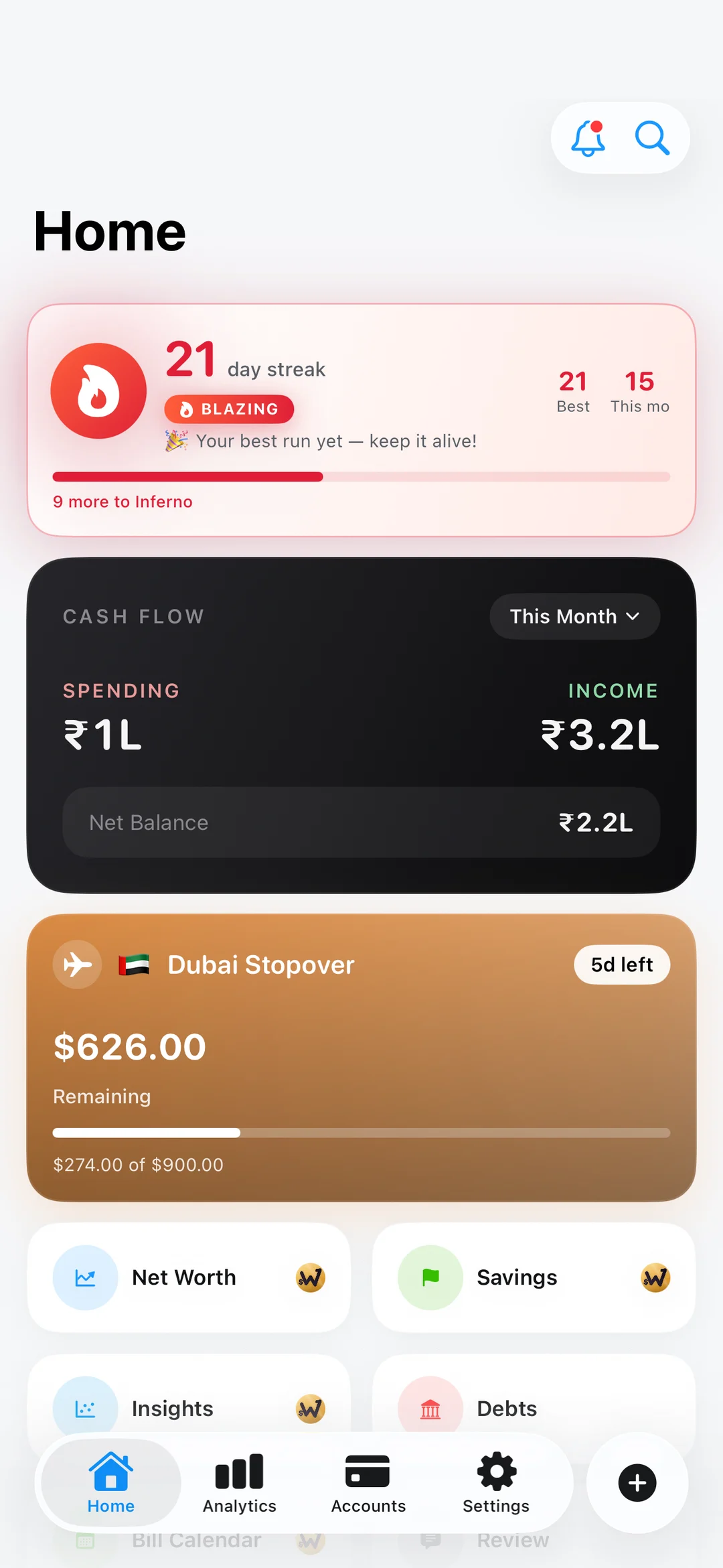
So they don't. Your logging streak earns a rank: Spark, Kindling, On Fire, Blazing, Inferno, Wildfire, Legend. The colour, the glow and the flame escalate with it. On the home screen, on the widget, and on your wrist, all reading the same ladder.

Apple Watch · Widgets

The one thing a phone
can't do.

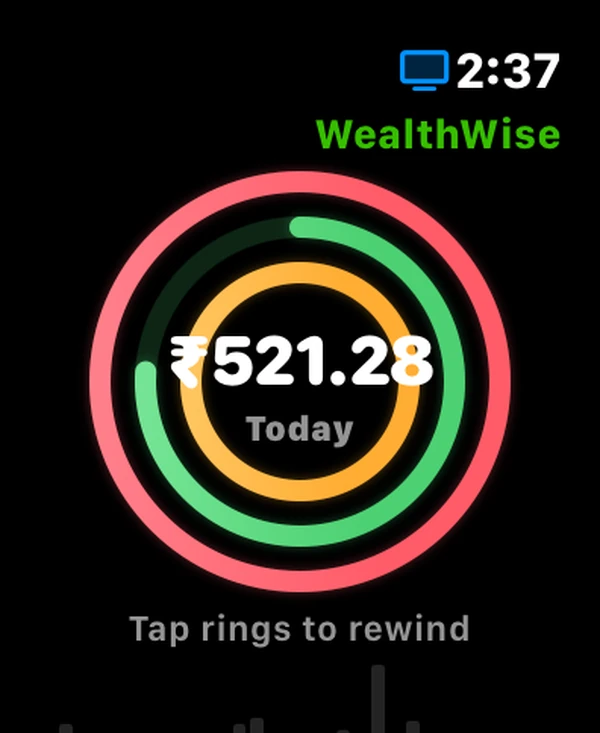
A phone has no crown. Tap the rings on your wrist and the Digital Crown is handed to you, one detent per day, thirty days back, with a haptic tick on each. The figure, the date and the highlighted bar all rewind together.

9:41
LEFT
62%
TODAY
₹2,340
₹1,240 left
Complication
Reads its own cached snapshot, so the face stays honest even hours out of range.
The WealthWise watch app: three rings for today's spend, with the day's total in the middle.
Dashboard
Three rings: spend against budget, savings rate, the week's logging streak.
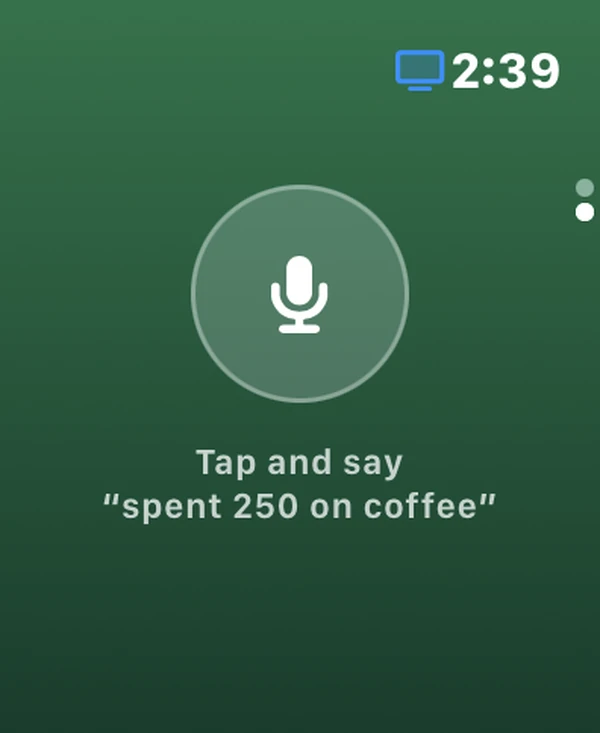
Logging an expense by voice from the watch: \u201cTap and say ‘spent 250 on coffee’.\u201d
Voice log ULTRA
“Spent 250 on coffee by cash.” It shows you what it understood, before anything is posted.

Log an expense on a hike. It still lands on the right day.

The phone owns the ledger; the watch owns nothing. So a wrist-logged expense is queued with guaranteed delivery (chosen precisely because a watch is routinely out of Bluetooth range) and stamped with the moment you tapped. A Saturday coffee lands on Saturday even if your phone doesn’t see it until Monday.

The wrist never lies about the total.

Because the phone confirms asynchronously, the watch counts its own not-yet-synced expenses into today’s figure and shows an “N waiting for phone” badge, rather than appearing to swallow your tap.

It follows your phone’s theme, not the watch’s.

watchOS has no user-facing light mode, so an app that reads the system scheme is always dark, which would make anyone who deliberately chose Light the one person whose app ignores them. Dark is true black, so there’s no seam against the face on OLED.

Answers, without opening anything.

A widget gallery in three sizes, fed by one payload, so the home screen, the widgets and the watch can never disagree about what today's spend was.

SPENT TODAY
2,340
₹1,240 left today
67
day streak
BLAZING · best 91
🇦🇪Dubai Stopover5 days left
Budget
AED 7,500
Spent
AED 4,360
Left
AED 3,140
58% of budget used
THIS MONTH
66%
Income1,42,000
Expenses87,390
Net54,610

Small · Spent Today, Budget Left, Net This Month, Top Category, Savings Rate, Logging Streak, Trip Budget
Medium · Budget Progress, Month Overview, Income vs Expense, Top Categories, Cashflow, Streak Activity, Trip Overview
Large · Dashboard, Category Breakdown, Cashflow Trend, each with a one-tap deep link straight into the add sheet